Friday, 15 May 2009

Nice quote about Smalltalk

"The thing that I really hate about Smalltalk though, is the fact that every time I wish C++ or Java did something differently it turns out that Smalltalk does it the way I want it to. I've never even used Smalltalk on a real project. I just learned it so that I could read source code, now I keep running into things that would be easier if I were using it. It's really annoying."


Attributed to Phil Goodwin, but I've no clue as to the origin.

Saturday, 16 August 2008

Caching static web content with Seaside


Given that it looks as though ircbrowse has gone away permanently, I decided to write my own little client for viewing the logs of the #squeak IRC channel. Fortunately most of the hard work had already been done at http://tunes.org/~nef/logs/squeak/, but as the site itself notes: "these logs are purposely "raw" and are intended to be parsed/reformated/wrapped before viewing."

So I put together a client in Squeak and Seaside, currently viewable at http://mykdavies.seasidehosting.st/seaside/my/irclog to do that for me. While I was doing so, I got a bit carried away and added some extra features:
  • All lines can be colourised based on the author's nick
  • It attempts to recognise HTTP URLs and converts them to links
  • Each message timestamp is an anchor, so you can link to a given message
  • At certain times there's a lot of chat in Spanish on the channel, so I added in-page translation capabilities using the Google Ajax Translate API.
  • Key session parameters are added to the URL, so that they are maintained even when the session has expired.
Now, once you've added all these great features, you end up with a massive page that's complex to generate, but once it is generated most of the content remains static. There's not a great deal that I can do about the initial generation (except get rid of some of the functionality), but surely I can cache that content?
I searched the Seaside mailing lists, but generally responses tended to point out that caching of static content should be handed off to the front-end web server. There were two problems here -- first, the page wasn't going to be totally static, just the content from a single component. Second, I wanted to put this application on seasidehosting.st, so I wouldn't have this option available to me anyway.
They say that once you get a hammer, every problem looks like a nail, so I wrote a Seaside solution: a simple caching component using the decorator pattern that checks to see if the content requested is already in the cache, and if not it asks the owner component to generate it. This proved to be very effective; the profiler showed that a non-cached page was taking around 2-3 seconds to generate, but with the HTML cached, this dropped to a handful of milliseconds. 
Given that this approach can substantially reduce the server load even when the page as a whole isn't static, I was surprised not to find something like this in Seaside already, is it too trivial? -- please let me know in the comments if I missed something obvious.
There's nothing particularly clever about the class once you've worked out that all the html that has been generated at any point in time is accessible via html context document stream. However, this approach requires A WARNING -- no session information must be used within the cached components -- no forms, no dynamic links, no Scriptaculous functions. Also, be careful about use of html nextId in the cached component - there is no guarantee that such IDs will be unique when incorporated into a document from the cache.
Anyway here's how it works. The component in question is wrapped in an application-specific subclass of a caching decorator component that:
  1. Maintains a cache dictionary as a class instance variable.
  2. Requires the owner class to implement a #key method that provides a unique key for each page, and also an inst-var called shouldCache (with associated accessors).
  3. Implements #renderContentOn: that 
    1. Checks if the requested page is in the dictionary (using the #key method).
    2. If so, stream the cached content to the current renderer and return.
    3. If not, notes the current html context document stream position.
    4. Sends #renderContentOn: to the owner.
    5. In this method, the owner then renders as normal, and resets shouldCache if it doesn't want the current page to be cached (ie if it is still subject to change).
  4. Control then returns to the decorator. If shouldCache is still set, this checks the html context document stream to find all the content that the child added, and copies it into its own cache, and exits.
And that's it!

Thursday, 17 July 2008

My first video: creating a Hello World class in Squeak


Given the recent push to get Squeak video tutorials available, I decided to have a go myself. I took as my starting point my post from a few months back, intended to act as a quick introduction to developers coming to Squeak for the first time.
My first problem was to find a good screen capture utility. Unfortunately, Wink isn't available for OS X, but a bit of searching uncovered Snapz Pro X. Despite the terrible name, it's a very nice piece of software that makes recording video and screenshots very easy. It comes with a 14-day fully-functional trial, so if I get a taste for this, I may end up having to cough up the $69 soon. If anyone knows of other software I could use, please let me know.
You can view the video at vimeo.com, or find it in the new Squeak Smalltalk group that Randal Schwartz has set up. Have a look at the video and let me know what you think: too fast, too slow, too much like Ricky Gervais, whatever.

Monday, 14 July 2008

Using Apache as a front-end for Seaside


I'll admit it, configuring Apache scares the bejeezus out of me. The documentation seems to be so focused on the trees, that the wood becomes an impenetrable, gloomy forest. I guess I'm not alone in this, which makes Ramon Leon's posts on configuring Apache with Seaside(1, 2, 3) so useful.
Despite this, I've still steered clear of going near Apache, until Ramon posted a sample extract of configuration text. Now, cut-and-paste is something I can do, so I decided to give it a go.
I'm on Mac OS X, so Apache is installed and running by default. Despite my earlier protestations, I have played with Apache before, so I knew that httpd.conf was the key file to control how Apache runs. A bit of poking about in man files uncovered the location of the file I needed: /private/etc/apache2/http.conf.
I opened a Terminal and cd'ed to /private/etc/apache2/ where I could execute sudo vi httpd.conf which prompted me to enter my password to edit this administrator file, and then allowed me to start hacking. I wanted to leave my existing configuration as untouched as possible, so below the line:
Listen 80
I added a new line:
Listen 81
which would start Apache listening on port 81 as well as port 80. I could then use port 81 for my experimentation.
Typing sudo /usr/sbin/apachectl restart caused Apache to restart, hopefully loading my change.
I then tried browsing http://localhost:81/


Success (so far) - Apache is trying to deal with my request, and using its default handler.
Now, I'd noticed an interesting line at the bottom of httpd.conf:
Include /private/etc/apache2/other/*.conf
which meant that I could make any other changes in a separate file. So sudo vi other/seaside.conf opened a new .conf file, into which I typed:
virtualhost>
    #ServerName yoursite.com
    #DocumentRoot /var/www/myExamplePath
    RewriteEngine On
    ProxyRequests Off
    ProxyPreserveHost On
    UseCanonicalName Off
    # if the path doesn't exist, rewrite it to be a Seaside file ref
    RewriteRule ^/seaside/files(.*)$ http://localhost:8080/seaside/files$1 [P,L]
    RewriteCond %{DOCUMENT_ROOT}/%{REQUEST_FILENAME} !-f

    # redirect all requests to seaside - configure this as required
    RewriteRule ^/(.*)$ http://localhost:8080/seaside/$1 [P,L]

/virtualhost>

Which (when you put back the angle brackets that Blogger eats on the first and last lines) is taken directly from Ramon's post. It does two useful things. It takes any requests coming in to port 81, and first checks to see if you're requesting a physical file, and if so, serves it up (useful for the static parts of your site). If not, it passes them on to Seaside on the appropriate port, adding the standard /seaside prefix (so this is hidden from the outside world, which is a nice touch). Restarting Apache again and this time browsing http://localhost:81/examples/counter got me:


Again, good news. However, when I tried to navigate around, or use applications that made use of built-in #style and #script methods, things started to go wrong. The reason here is that Seaside prefixes its generated relative URLs with /seaside. So I simply added the following:
# re-write all requests starting with seaside - these links are exposed
# by the application internally. Alternatively, you can
# re-configure Seaside to change the urls it generates.
RewriteRule ^/seaside/(.*)$ http://localhost:8080/seaside/$1 [P,L]

into the virtualhost directive, and re-started Apache once more. This time it all worked like clockwork.
Twenty minutes of not very challenging experimentation, and I now have Apache working as my front-end webserver. That means, all the handling of static files can be done outside of Squeak, I can configure my responses if the Squeak images crashes, I get access to all of Apache's features such as logging, SSL etc. Not a bad half-hour's work really.

Tuesday, 8 July 2008

Digging into the functionality behind morphs

Someone on the Seaside mailing list asked how to find out the meanings of all the icons against each method in the browser. The answer is quite interesting, as it helps you understand the importance of the "live environment" that Squeaks gives you.

Looking at a typical class, you'll see that many method definitions have a little icon by the name:


(nb alt- and cmd- prefixes used below may need to be changed depending on your image preferences).

In order to work out why things happen in morphs, you can easily access the underlying code. In this case, alt-click on the offending item repeatedly to bring up halo menus for more targeted morphs. The closest in you get is OBLazyList - if you go too far, you'll notice that you cycle round to the original morph again. Notice in this case that this morph is much bigger than its containing morph, and so much of its content is hidden from the user:


When you're on the morph you're after, you can then find out more about it by clicking on the "spanner" (=debug) icon, and selecting "browse morph class", which will open a browser on OBLazyListMorph.


Look in the "drawing" methods of this class, and you'll get your first clue in #display:atRow:on: which selects and draws the icons with the help of OBMorphicIcons class.


Selecting the name OBMorphicIcons and pressing Cmd-B will bring up a browser on that class, and you'll see that each icon is defined by an instance method. Click on one of these (I chose #arrowUpAndDown because that looks pretty likely to be unique to this usage), and press Cmd-n to find its senders.


Bingo! OBInheritanceFilter method #icon:forNode: decides which icon to display based on a number of tests, including a test for #halt: messages that puts a red flag against a method.


You'll also see that this code accidentally red-flags itself because it fails to distinguish between #halt: used as a symbol rather than as a message.

Friday, 23 May 2008

Ideal language for the JVM?

Charles Nutter (JRuby specialist at Sun) said recently:

"The CLR kind of grew up on the static language side of the world, from the C++ folks, whereas Java grew up on the Smalltalk side of the world. It was actually grown out of a Smalltalk VM. So what we have on the JVM, oddly enough, is a dynamic language runtime under the covers powering a statically typed language. The work that we are doing in future versions of the JVM and the work that we're doing with JRuby and the current set of dynamic languages is essentially exposing that capability to run dynamic languages extremely well to all of the different language implementations."

Makes you wonder what would be the ideal dynamic language to run on the JVM, doesn't it?

Thursday, 22 May 2008

Scripting with Smalltalk - updated

My post yesterday attracted more attention than I expected, with Paolo Bonzini and Randal Schwartz both being able to make out the code well enough to comment on it. Paolo was able to identify a number of improvements to the code, both in terms of identifying more appropriate approaches, and in identifying where the code was spending its time. As a result, here's a much faster version. It's also noticeably shorter at 31 lines excluding spaces and comments, but it's still very wide.

This version also uses a few more methods not found in core Squeak including #fold: #gather: #copyReplaceFrom:to: .

As Randal pointed out, I'm monkey-patching core classes with gay abandon, and subclassing would probably be safer, though the over-ride of #at: that (rightly) alarmed him is now gone.


"Inspired by http://norvig.com/spell-correct.html"
"s = SpellCheck new. s initialize. s correct: 'misplet'"
Collection extend [
ifEmpty: block [ self isEmpty ifTrue: [ ^ block value]. ^ self ] "not in gst by default"
maxUsing: block [ ^ self fold: [ :a :b | ((block value: a) > (block value: b)) ifTrue: [ a ] ifFalse: [ b ] ] ] ]

String extend [
swapAt: i [ ^ self copyReplaceFrom: i+1 to: i+2 with: {self at: i+2. self at: i+1} ]
removeAt: i [ ^ self copyReplaceFrom: i+1 to: i+1 with: #() ]
insert: l at: i [ ^ self copyReplaceFrom: i+1 to:i with: {l} ]
replace: l at: i [ ^ (self copy) at: i put: l; yourself ]
findWords [ ^ (self asString tokenize: '[^a-zA-Z]+') collect: [ :each | each asLowercase ] ] ]

Object subclass: SpellCheck [
| nwords alphabet |
initialize [ | lines |
lines := (File name: 'westminster.txt') contents.
nwords := lines findWords asBag.
alphabet := 'abcdefhgijklmnopqrstuvwxyz' asArray ]

edits1: word [ | n |
n := word size.
^ Array join: {
0 to: (n - 2) collect: [ :i | word swapAt: i ].
1 to: (n - 1) collect: [ :i | word removeAt: i ].
alphabet gather: [ :letter | 1 to: n collect: [ :i | word replace: letter at: i ] ].
alphabet gather: [ :letter | 0 to: n collect: [ :i | word insert: letter at: i ] ] } ]

knownEdits2: word [
^ (self edits1: word) gather: [ :e1 |
self known: (self edits1: e1) ] ]

known: words [ ^ ( words select: [ :each | nwords includes: each ] ) ]

correct: word [ | candidates |
candidates := (self known: {word}) ifEmpty: [
(self known: (self edits1: word)) ifEmpty: [
(self knownEdits2: word) ifEmpty: [ {word} ] ] ].
^ candidates maxUsing: [ :d | nwords occurrencesOf: d ] ]
]

Wednesday, 21 May 2008

Scripting with Smalltalk

When I saw this post by Peter Norvig, and especially the lines-of-code comparison towards the end of the page, I thought it would be interesting to see how Smalltalk compared. Given the line-of-code metric, this was an ideal chance for me to play with GNU Smalltalk, which positions itself as a scripting-friendly Smalltalk. It proved to be quite a straightforward exercise, and the code came out surprisingly compactly (but quite wide!):

"Inspired by http://norvig.com/spell-correct.html"
"s = SpellCheck new. s initialize. s correct: 'misplet'"
Dictionary extend [
at: key [ ^ self at: key ifAbsent: [ 1 ] ] "make it a defaulting at:"
incrAt: key [ self at: key put: ((self at: key) + 1) ] "increments value" ]

Collection extend [
ifEmpty: block [ self isEmpty ifTrue: [ ^ block value]. ^ self ] "not in gst by default"
bestUsing: d [ ^ self inject: 'xxx' into: [ :sofar :this | ((d at: sofar) > (d at: this)) ifTrue: [ sofar ] ifFalse: [ this ] ] ] ]

String extend [
swapAt: i [ ^ (self copyFrom: 1 to: i), (self at: (i+2)) asString, (self at: (i+1)) asString, (self copyFrom: (i+3) to: self size) ]
removeAt: i [ ^ (self copyFrom: 1 to: i), (self copyFrom: (i+2) to: self size) ]
insert: l at: i [ ^ (self copyFrom: 1 to: i), l asString, (self copyFrom: (i+1) to: self size) ]
replace: l at: i [ ^ (self copy) at: i put: l; yourself ]
findWords [ ^ (self asString tokenize: '[^a-zA-Z]+') collect: [ :each | each asLowercase ] ] ]

Object subclass: SpellCheck [
| nwords alphabet |
initialize [ | lines |
lines := (File name: 'bigtext.txt') contents.
nwords := self train: lines findWords.
alphabet := 'abcdefhgijklmnopqrstuvwxyz' ]

train: features [ | model |
model := Dictionary new.
features do: [ :each | model incrAt: each asLowercase ].
^ model ]

edits1: word [ | s n |
s := Set new.
n := word size.
0 to: (n - 2) do: [ :i | s add: (word swapAt: i) ].
1 to: (n - 1) do: [ :i | s add: (word removeAt: i) ].
alphabet do: [ :letter |
1 to: n do: [ :i | s add: (word replace: letter at: i) ].
0 to: n do: [ :i | s add: (word insert: letter at: i) ] ].
^ s asArray ]

known_edits2: word [ | s |
s := Set new.
(self edits1: word) do: [ :e1 |
(self edits1: e1) do: [ :e2 |
(nwords keys includes: e2) ifTrue: [ s add: e2 ] ] ].
^ s asArray ]

known: words [ ^ ( words select: [ :each | nwords keys includes: each ] ) asSet asArray ]

correct: word [ | candidates |
candidates := (self known: {word}) ifEmpty: [
(self known: (self edits1: word)) ifEmpty: [
(self known_edits2: word) ifEmpty: [ {word} ] ] ].
^ candidates bestUsing: nwords ]
]

54 lines of not very idiomatic Smalltalk including blank lines and comments (such as they are). More than twice as many lines as Peter Norvig's Python solution, but 1/6th of the size of the Java solution!

It felt very strange - and frustrating - to be developing in Smalltalk without the full support of the traditional environment, especially as I was trying to pick up the subtle differences from Squeak Smalltalk, but the ability to 'extend' the core classes from within the scripts means that it will be very easy to be able to hack out scripts using this tool.

Sunday, 11 May 2008

Using OpenDBX with Squeak

A team of students from UTN (National Technological University in Argentina) co-ordinated by Estaban Lorenzano has just been doing some work on SqueakDBX, a package to allow Squeak to access OpenDBX functionality, which gives a lighter-weight alternative to ODBC for connecting to databases including Firebird, Interbase, MS SQL Server, MySQL, Oracle, PostgreSQL, SQLite, SQLite3 and Sybase.

This uses the FFI (Foreign Function Interface) package (available through Package Universe), and requires access to the libopendbx library. Now I had a bit of fun and games working out how to do this on Mac OS X, so here's the magic that worked for me.

Firstly, I was interested in using PostgreSQL to compare with the Squeak postgres support which is already installed on my machine. I downloaded the OpenDBX source -- it's a UNIX tool, so distributed as source needing compilation -- you open a Terminal and change into the newly downloaded directory, and execute configure command as directed by the README: ./configure --with-backends="sqlite3 pgsql", but in my case this barfed because it couldn't find my postgres libraries. This was solved by manually pointing to the postgres library and include directory, as follows:

CPPFLAGS="-I/usr/local/pgsql/include/" LDFLAGS="-L/usr/local/pgsql/lib/" ./configure --with-backends="sqlite3 pgsql"

You'll see that I also set things up for SQLite3 as it's installed by default on OS X, and is increasingly being used to hold configuration files in OS X and Firefox. I know that there's a SQLite3 package for Squeak already, but I thought it would be interesting to compare the two.

Anyway, the configure stage now worked perfectly, and sudo make install installed the libraries for me. All I needed to do now was make Squeak FFI see the libraries. Ha! After a lot of poking about, I found this email from Jon McIntosh, which advised that creating a symbolic link to the library "in the right place is helpful". Thanks for the pointer John, but where's the right place???

Well, after a bit of experimentation, I found that I needed to create the link in the Resources directory of  the SqueakVM package:

cd /Applications/Squeak/Squeak 3.8.18beta1U.app/Contents/Resources
ln -s /usr/local/lib/libopendbx.dylib opendbx

And that's it. I'm now able to access my PostgreSQL database with code like this:

conn := DBXConnection new
backend: DBXBackend postgresql;
  connect: '127.0.0.1' port: 'x';
  open: 'x' name: 'x' password: 'x' method: 0.
  resultSet := conn query: 'select * from airline'.
DBXTranscript show: resultSet.
conn disconnect.
Smalltalk garbageCollect.

It's still very early days for the project, and it is not yet production-ready, so I've not tried doing anything much with it, but I notice that Esteban and colleagues appear to be building in GLORP support from the outset, so it's worth keeping an eye on this project.

Thursday, 13 March 2008

Snippet: how to trigger events on a checkbox in Seaside

Richard Eng was having trouble using a checkbox to trigger a change in the contents of a textarea.

Lukas responded that:
To trigger a callback of a form element, you need to specify this form element with #triggerFormElement:. As the comment of this method says, this does not work for multi-select lists and checkboxes, as those two form elements internally depend on another hidden form element. So for your checkbox you need to trigger the whole form. Give it an (unique) id and use #triggerForm: with this id.
(my italics)

Gerhard Obermann kindly provided a working sample:

renderContentOn: html
"requires 'set' to be defined as an instvar"
| formId |
formId := html nextId.
html form id: formId;
with: [
html checkbox value: false; callback: [ :v | set := v ];
onClick: (
html updater id: 'text';
triggerForm: formId;
callback: [ :r |
set
ifTrue: [ r text: 'My address' ]
ifFalse: [ r text: '' ]]).

html textArea id: 'text';
with: [ html text: 'Empty' ]].
This was a great help to Richard, prompting him to ask why there isn't more information like this out there - much of what he found while teaching himself Squeak and Seaside was out-of-date and wrong. Maybe a snippets library would be a good starting point?

Monday, 17 December 2007

How to create a class in Squeak - an illustrated step-by-step guide

A lot of people are flummoxed when they first open a Squeak image, especially developers who want to just get on and write some Smalltalk code. This guide should help you get over that first hump. To start off, I'll assume that you've got a Squeak image running and you're looking at a screen wondering what to do now!

First, for this exercise, you can close any windows in Squeak by pressing on the 'X' on the title bar, or minimise them by pressing on the 'O'. Once you've cleared a little space, click on the Squeak desktop to bring up the 'World Menu':
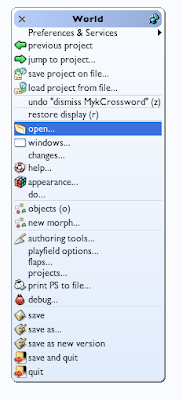

Clicking on the 'open' item brings up a useful menu showing lots of interesting tools that you can open. It's worth coming back to this menu to investigate all these tools, but for now we're interested in opening a 'system browser', so click on that:


This brings up the system browser; most of your code creation and editing will happen here. It has lots of powerful features - try right-clicking on the various panes to get an idea of the functionality it exposes. The left-hand pane shows 'Categories' (kind of like packages or modules in other languages). Clicking on a category shows all the classes in that category.

Let's create a new category for our code to go into. Right-click on the categories pane (the left-hand pane) to bring up its menu, then click on 'create category...':


This brings up a 'Fill-In-The-Blank' menu, which waits for you to enter a value:
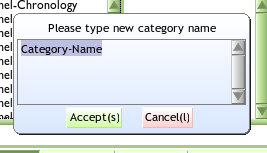

Here, I've entered 'MyTestCategory':
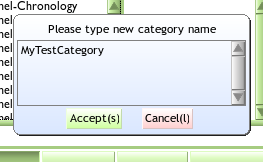

Clicking the Accept button will commit this name (the (s) on that button indicates that pressing (Ctl-s will have the same effect). You will then see that your new category has been added at the bottom of the Categories pane (if a category with that name already existed, you'll be shown that category and its contents - it's best to avoid adding classes into pre-existing categories until you know what you're doing).

The large 'code pane' at the bottom of the window has also been pre-populated with a 'class creation template':
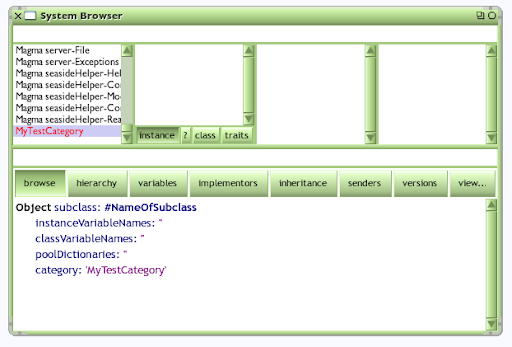

Editing this pane will allow us to create a new class and define its instance- and class- variables. For the moment, let's just create a simple class; leave the template unchanged except for replacing NameOfSubclass with the name of the class you want to create. Note that this means that your new class will be a subclass of Object, with no instance or class variables, created in the 'MyTestCategory' category:
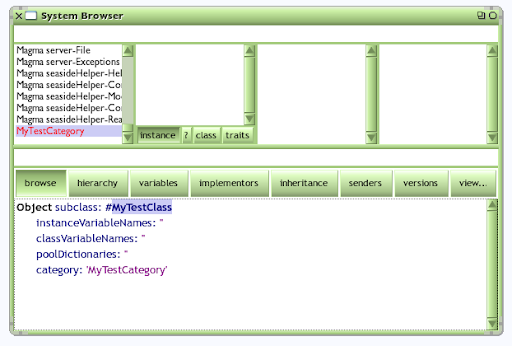

Pressing Ctl-s will accept this change. If you've picked a name that is already used in Squeak, you will get an error message, and you should cancel and try again. Once you've settled on a unique name, you will see your new class appear in the classes pane. Make sure that the 'instance' button is selected (the other buttons show class comments; class methods; and any traits of the class -- all beyond the scope of this simple introduction):


You can now add a method to your class by clicking on '--all--' in the messages pane (a 'message' being the Squeak equivalent of a 'method' in other languages). This brings up a 'new method template' in the code pane, which shows the four key elements of a method definition: its name, a comment, its local variables, and some code statements (as below). If your code pane doesn't look like this, try clicking on '--all--' again -- editing before this text has appeared means that you're not editing method text, and you will get an error when you try to save.
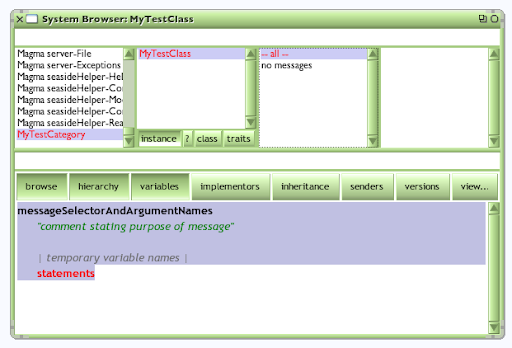

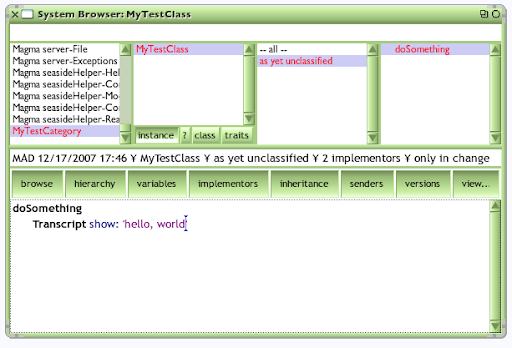
Replace the template code with your own code. The code below defines a method called 'doSomething' that will print out a helpful and informative message on something called the Transcript. Press Ctl-s to accept the code, and you will see the method appear in the methods pane on the right-hand side. The third pane allows you to organise your methods into useful groupings, but as we've not done this, our method is identified as being 'as yet unclassified':

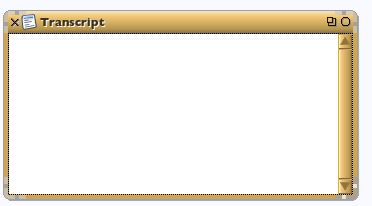
Let's make a Transcript window for our output. Open the World menu, select the Open sub-menu and click on transcript, and a Transcript window will appear:
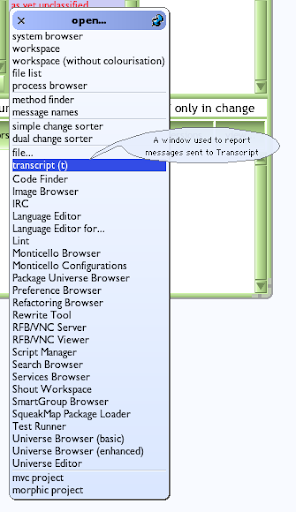

A Transcript is a simple logging window, often used to capture debugging information, and is where our class will send its output:

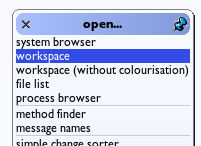
Now we want to call our class' method. First create a workspace, which is where you can execute Squeak code:

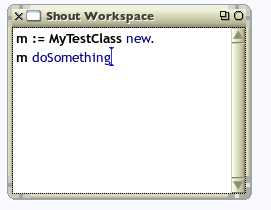
We can now create a new instance of your class, by sending the message 'new' to the class, and hold the resulting instance in the variable 'm'. Note the final '.' which is Squeak's statement separator. Press ctl-d (to Do-it):


To call the method on our new instance, type in 'm doSomething' and then ctl-d to execute it:

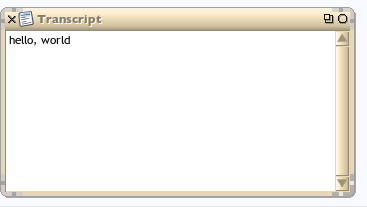
And there you go; you've created a class, created an instance of that class, and sent a message to that class, resulting in some visible output:

You might like to open the World menu again, and click on 'save' to keep hold of this valuable code.

Saturday, 1 December 2007

How to use decorator WAFormDecoration

This is a very simple example of how to use a decorator in Seaside, based on my understanding from two blogs. A decorator allows you to wrap standard functionality around the content generated by your component, so hiding a lot of the 'boilerplate' complexity otherwise required. This example allows you to build up a form with buttons of your choice; provide a list of buttons, and a matching method for each.

You need to ensure that you have a very recent (533 or later) version of Seaside for the defaultButton behaviour to take effect correctly. If you're using multiple decorators, don't forget to make the FormDecoration the last one you apply.

WAComponent subclass: #SimpleTestForm
instanceVariableNames: ''
classVariableNames: ''
poolDictionaries: ''
category: 'Sample'

initialize
| form |
super initialize.
form := WAFormDecoration new buttons: self buttons.
self addDecoration: form.

buttons
^ #(okay cancel)

okay
"your action goes here"
self inform: 'you pressed okay'

cancel
"your action goes here"
self inform: 'you cancelled'

defaultButton
^ self buttons first


renderContentOn: html
"usual form contents go here"
html textInput.
html text: 'asd'
"etc"

Friday, 13 July 2007

Morphic development tutorial

Stephen Wessels has put together a very thorough development tutorial at http://squeak.preeminent.org/tut2007/html/index.html

It's aimed at new Squeakers and introduces and explains the main elements of the development environment, as well as giving an insight into areas such as test-driven development, object-oriented design, and code refactoring.

Wednesday, 23 May 2007

Sending mail from your Seaside application

There's a very useful step-by-step guide on how to send emails from your Seaside application at saush.com, which also documents an experienced developer's first experiences with Squeak. All good stuff.

Tuesday, 8 May 2007

Simple Seaside & Magritte application

Ramon Leon continues his excellent series of blog posts on Squeak - this time to note his creation of a sample application demonstrating how to build a simple application using Seaside and Magritte.

This is a great introduction to building a web application using these tools, and I found it a useful exercise to see how Ramon dealt with some of the common tasks involved in such an application: persistence, user session management, and controlling application flow.

Friday, 30 March 2007

Golden nuggets

There's a lot of useful discussion going on over the seaside mailing list at the moment, triggered off by a question from Andreas Raab asking about some of the mechanics of Seaside. Some key points that were interesting to me:

A component is responsible for generating a part of the html of a "page". This includes forms, since they are part of html (note that you must not nest forms, forms really suck in html). The (visible) part inside the <body> is generated in #renderContentOn:. The part in the <title> is generated in #updateRoot: (create your metas here).

...

CSS depends on your needs. There are about three different ways for different situations. In general you assign the correct classes and ids to your html elements and the CSS comes from "somewhere" outside. You will have to write your CSS by hand (or let it write) Seaside doesn't help you there. It just gives you a choice where to put it.

...

Seaside doesn't have "special rules" but it does (by default) use a convention to make this stuff a little safer. Normally, the transition from one page to another is split into two request-response cycles. The first triggers the callbacks associated with the link or form elements, and Seaside sends back a 302 response, redirecting the browser to another url. The second request triggers no callbacks and is a "pure" HTTP GET. Seaside sends back an html representation of the page in its new state. That page can be reloaded as much as you like with no side effects.

...

Basically, since Seaside is component based anyway, many people build a root component to contain header, footer, menus, etc, and then a component for body. You can then set the body component to any component you like and it'll render, no need for call. As Goran said, the component model is what makes Seaside rock so much, it's just like programming a desktop application, no fussing with state.

...

#call: is useful when you want to be able to switch a component in the page layout, in place, with zero effort [and] we are in direct control of the component's composition. #call: is a lower-level framework feature. For example, [in] this callback:

html anchor
callback: [counters atRandom call: WAMiniCalendar new];
with: 'Call component at random'.

we #call: one of the components. The effect of this is to show the mini calendar in place of one of the counters. We have not had to say anything else to achieve this, and get #answer support, back button support, etc.

...

In retrospect the main benefit, as I see it, of Seaside in Gjallar is the component model. The fact that I can construct the UI using separate components that can be used embedded inside each other and still render themselves totally oblivious of the environment and the request/response cycle.

The reason for this is of course the fact that a WAComponent is "persistent" in the user session and can hold all its state simply in instvars. So it erases the need for "inter request client side state management" using say URL params or hidden fields and so on.


All of which was followed by a general lament at the state of documentation for Seaside...

Saturday, 17 February 2007

A new GUI builder for Morphic

A few weeks ago I posted a comment to the squeak-dev mailing list bemoaning the current state of UI support in Squeak. My concerns were:

Most of [the many GUI-builders in Squeak] are incomplete, out-of-date, and abandoned; but they show that developers are repeatedly coming back to a need to find an easy way to create and manage a user interface that employs the metaphors that have become familiar to most desktop users. Not a "Windows clone", but perhaps something like Tk or Swing Metal -- familiar enough, but not tied to the platform -- and not requiring extra installation above and beyond the Squeak VM & image.

After looking at the options (and trying unsuccessfully to make prefab usable for me), I gave up! I'm now using Seaside to build the UI for my applications. This isn't a perfect answer, in fact using a complex mix of HTML CSS and JS to replicate a rich client interface is pretty
mad, but it quickly gives me a user interface that is familiar and can be layed out quickly and easily.

If I had access within Squeak to a full set of UI widgets that had a consistent look and feel, were more 'mainstream', and preferably came with builder tools (perhaps Magritte with layout hinting), I'd love to have the power of Morphic under the covers, but as it is, Seaside is
the best game in town.


Well, it looks as though half of my dream has come true! Noury Bouraqadi has published details of his Easy Morphic GUI, which allows you to build up the GUI for a Morphic application, and some of the event handling, using a drag and drop interface. It requires your parent morph to be a subclass of his EMGGuiMorph, but will accept any morphs from the Parts Bin.

This may well inspire me to try to build a few UI elements with a more conventional look and feel.

Friday, 16 February 2007

Sample Image Viewer - a simple SystemWindow application

One of the problems I, and many other beginners, had when coming to Squeak was in building a GUI for my application. There are many half-built and unmaintained GUI builders out there, but most of the core Squeak applications are built manually using SystemWindow. Although these are thought of as self-documenting, I found it difficult to see the wood for the trees when examining them.

My first experiment was to build a simple Image-viewer application, which demonstrates how to build a SystemWindow-based application, how to access the file system and how to interact with the user.

It's packaged up as a Monticello package. If this is not something you've used before, have a look at the Wiki notes page, which gives full instructions on how to download using Monticello.

Wednesday, 14 February 2007

Good (though old) lecture notes on Smalltalk

I've just found a link from the Squeak wiki to a set of lecture notes from Ralph Johnson (one of the Design Patterns "Gang of Four") on Smalltalk (based on VisualWorks, though he has since migrated to Squeak):
http://st-www.cs.uiuc.edu/users/johnson/cs497/notes98/online-course.html

The lecture notes are accessible, but the video links aren't as they're copyrighted by the university. If you're interested in finding the videos, you could try searching the squeak beginners' mailing list to find a reference...

Wednesday, 7 February 2007

anObject select: #aMethodName considered harmful

I was browsing some of the Magritte source code, when I saw a message that confused me:
       selectors := anObject class allSelectors
select: #isDescriptionSelector.
I couldn't understand how you could pass a Symbol to #select: instead of a block-- certainly the definition of Collection>>select: implies it should only take a block. But trying it for myself, I saw it worked-- eg
{ 1. 2. 3. 4. } select: #even.
can be used in place of:
{ 1. 2. 3. 4. } select: [ :each | each even ]
Given how much simpler this looks, I was surprised I'd not seen this usage before, and searching for senders of #select: shows that the wordier version seems to be generally preferred. So what's this all about?

A posted a question to the Squeak-Beginners mailing list, and very quickly got some good feedback. Ron Teitelbaum gave a full explanation:
It's a trick. It only works because #value: is implemented on symbol as:
Symbol>>value: anObject
^anObject perform: self.
So the following works too.
#asUppercase value: 'I am a trick'
My suggestion is that you shouldn't follow such tricks. Although I do it too sometimes with things like:
aDictionary at: #foo ifAbsent: nil.
Since nil responds self to #value it seems redundant to me to put the nil in a block so that it can return nil when the block is evaluated with #value. Even though in this case the execution is faster but in the case of sending a symbol to select it is slower.

In both cases it is harder to read so in my opinion it is best to stick with arguments that are expected.
Lukas Renggli-- the author and maintainer of Magritte-- also responded, echoing Ron's comments, and adding that the latest versions of Magritte no longer use this idiom, so this is possibly the first and last place you will ever see this idiom used!